# Some easy tips for presenting TAB/notation in the forum, and a template to share
**URL:** https://forum.troygrady.com/t/some-easy-tips-for-presenting-tab-notation-in-the-forum-and-a-template-to-share/3006
**Category:** General Music Discussion
**Created:** [March 13, 2018, 4:39pm UTC](https://forum.troygrady.com/t/some-easy-tips-for-presenting-tab-notation-in-the-forum-and-a-template-to-share/3006 "2018-03-13T16:39:49Z")
**Posts on this page:** 20
**Page:** 1
### Author:  [@JakeEstner](https://forum.troygrady.com/u/JakeEstner)
#### Post date: [March 13, 2018, 4:39pm UTC](https://forum.troygrady.com/t/some-easy-tips-for-presenting-tab-notation-in-the-forum-and-a-template-to-share/3006/1 "2018-03-13T16:39:49Z")
Hi guys,
I notice sometimes folks try to present TAB here and the format gets a little wonky and hard to read - a couple of simple tips:
1. If you have ANY notation software, on mac at least you can simply do a screen shot and upload the image into the post, it’s much more legible. In other places (not this forum, unfortunately) you can actually just copy a screen shot selection to the clipboard and paste right into…whatever, email, text, facebook. If you’re trying to show a musical idea this is really the clearest way to do it, and probably fastest for you too!
2. If you don’t have any notation software here’s a tab template in monospace font - feel free to **copy** it and edit however you like [https://docs.google.com/document/d/1hqISRcuTNELJZJNZYBL6AvXtEwKAKaQqylJXP725Ems/edit?usp=sharing](https://docs.google.com/document/d/1hqISRcuTNELJZJNZYBL6AvXtEwKAKaQqylJXP725Ems/edit?usp=sharing) - then you can either do a screenshot and paste in the _image_, or share the link of your copied file. If you just paste in the _text_ in tab things don’t always line up the same depending on browser, quoting, mobile vs desktop, etc etc.
Hope that’s of use!
---
### Author:  [@Drew](https://forum.troygrady.com/u/Drew)
#### Post date: [March 13, 2018, 4:43pm UTC](https://forum.troygrady.com/t/some-easy-tips-for-presenting-tab-notation-in-the-forum-and-a-template-to-share/3006/2 "2018-03-13T16:43:59Z")
I’ev also had success writing out tab in Notepad or some other fixed-width text editor, and then pasting it and wrapping it in the “Preformatted text” code - select it, and click the button in the text editor that looks like \
But, some form of tab editor is definitely the way to go. 🙂
---
### Author:  [@Brendan](https://forum.troygrady.com/u/Brendan)
#### Post date: [March 13, 2018, 6:12pm UTC](https://forum.troygrady.com/t/some-easy-tips-for-presenting-tab-notation-in-the-forum-and-a-template-to-share/3006/3 "2018-03-13T18:12:31Z")
Thanks Jake, good tips!
One other thing that may be useful — Soundslice (the service we use for all embedded notation on [troygrady.com](http://troygrady.com)) has a free account that lets you create and edit notation (“slices”) right on their site, no additional notation software needed:
> **[Soundslice plans and pricing](https://www.soundslice.com/plans/)**
>
> Plans and pricing for Soundslice.
They also have two tiers of individual plans that come w/ more advanced features, quite reasonably priced particularly for teachers who might use it professionally. But the free plan offers pretty full functionality, just a few limitations on sharing and file formats.
This is the easiest way I know of to create notation that looks great on any device. The main downside when it comes to sharing here is there’s no way to embed directly in forum posts. But a good solution could be to combine screenshots (as static but direct “preview”) + link to the full notation on Soundslice (for full interactive playback).
For something super short, text-only tab may still be the lowest friction, but we really like Soundslice and it has a lot of nice features, so want to let everyone know you can make your own account there if you’d like to give it a try.
---
### Author:  [@JakeEstner](https://forum.troygrady.com/u/JakeEstner)
#### Post date: [March 13, 2018, 6:28pm UTC](https://forum.troygrady.com/t/some-easy-tips-for-presenting-tab-notation-in-the-forum-and-a-template-to-share/3006/4 "2018-03-13T18:28:15Z")
Ah yes! I know the Soundslice guys and actually have a channel on their new channels format: [https://www.soundslice.com/users/JakeEstner/](https://www.soundslice.com/users/JakeEstner/)
I forgot about the new free notation feature because I’ve had a teacher account for a while.
Anybody can actually make a channels page and _I think_ can then provide direct links to their soundslice posts (they do not have to include video/audio) as I did here: [I transcribed a crazy Rick Graham/Marshall Harrison lick](https://forum.troygrady.com/t/i-transcribed-a-crazy-rick-graham-marshall-harrison-lick/2871)
So if you just make a channels account you can simply write up the tab then dump a direct link in here. yeah, or screenshot the image.
It would be nice if we could paste images right into the text boxes here, because then we could just ‘copy’ the screenshot and paste it right in, rather than having to save the image as a file and upload that file.
---
### Author:  [@Brendan](https://forum.troygrady.com/u/Brendan)
#### Post date: [March 13, 2018, 7:37pm UTC](https://forum.troygrady.com/t/some-easy-tips-for-presenting-tab-notation-in-the-forum-and-a-template-to-share/3006/5 "2018-03-13T19:37:11Z")
Nice! Yeah they keep adding new features, including very full-featured built in editor, great to see.
I believe on Mac at least screenshots are always saved to a file (to Desktop by default) — but one shortcut is I believe you can just drag and drop an image right into the forum composer window, rather than having to click upload button + select file.
---
### Author:  [@RockStarJazzCat](https://forum.troygrady.com/u/RockStarJazzCat)
#### Post date: [March 13, 2018, 10:01pm UTC](https://forum.troygrady.com/t/some-easy-tips-for-presenting-tab-notation-in-the-forum-and-a-template-to-share/3006/6 "2018-03-13T22:01:12Z")
@Brendan, do you have an account name on there? Thanks in advance. Best, Daniel
---
### Author:  [@Brendan](https://forum.troygrady.com/u/Brendan)
#### Post date: [March 13, 2018, 10:22pm UTC](https://forum.troygrady.com/t/some-easy-tips-for-presenting-tab-notation-in-the-forum-and-a-template-to-share/3006/7 "2018-03-13T22:22:16Z")
I do have a Soundslice account but I don’t have anything posted to it. Soundslice has a “teams” feature so we each have individual logins but just as a way to log in to the linked Cracking the Code account. Haven’t used it yet in a non Cracking the Code capacity 🙂
---
### Author:  [@Tahoebrian5](https://forum.troygrady.com/u/Tahoebrian5)
#### Post date: [March 14, 2018, 2:38pm UTC](https://forum.troygrady.com/t/some-easy-tips-for-presenting-tab-notation-in-the-forum-and-a-template-to-share/3006/8 "2018-03-14T14:38:54Z")
I hope to use Soundslice soon, but for the moment you cannot add notes with IOS systems.
---
### Author:  [@aliendough](https://forum.troygrady.com/u/aliendough)
#### Post date: [March 14, 2018, 4:28pm UTC](https://forum.troygrady.com/t/some-easy-tips-for-presenting-tab-notation-in-the-forum-and-a-template-to-share/3006/9 "2018-03-14T16:28:18Z")
MuseScore is a great and fully featured free tab editor and I’d recommend it over any free tab editor. It can do loads more than tab.
[https://musescore.org/en](https://musescore.org/en)
I had been using MuseScore but decided to give Guitar Pro a shot and I love it. I would recommend this for a paid option.
---
### Author:  [@RockStarJazzCat](https://forum.troygrady.com/u/RockStarJazzCat)
#### Post date: [March 14, 2018, 5:15pm UTC](https://forum.troygrady.com/t/some-easy-tips-for-presenting-tab-notation-in-the-forum-and-a-template-to-share/3006/10 "2018-03-14T17:15:50Z")
> [@aliendough](#):
>
> I had been using MuseScore but decided to give Guitar Pro a shot and I love it. I would recommend this for a paid option.
Now that the iOS app has been updated to Guitar Pro 7 support, all the better!
---
### Author:  [@garbeaj](https://forum.troygrady.com/u/garbeaj)
#### Post date: [March 18, 2018, 6:54pm UTC](https://forum.troygrady.com/t/some-easy-tips-for-presenting-tab-notation-in-the-forum-and-a-template-to-share/3006/11 "2018-03-18T18:54:48Z")
Getting a professional looking TAB created has been a real stumbling block for me. Since you basically have to have a pretty complete knowledge of music theory to be able to use the formats that I have tried (Guitar Pro and Sibelius) they are useless to a theory-less idiot like me. I have resorted to just handwriting TABs with all the pertinent notations and then taking a picture of them with my phone or scanning the handwritten sheets. I have a guy that can put the TABs I create into professional TAB software, but it isn’t cheap.
I feel like I have to be a graduate of Julliard to be able to even use TAB software, but I work on a lot of my own transcriptions that I’d like to be able to share more easily. I REALLY want to be able to share the observations and TAB transcriptions of my friend and mentor Bill, which include exact picking directions, left hand fingerings (ie. T=Thumb, I=Index, M=Middle, R=Ring and P=Pinky) and all sorts of notes on articulations, but even with the help of my professional transcriber, the text becomes very dense and hard to read. I’d like to be able to use a contrasting color to define the different articulations (like maybe a blue color just for left hand finger notations and maybe red for Hammers and Pulls?) which would make the notation easier to read. When you combine all the other articulations like slides, pickslides, tremolo bar dives, etc. it gets to be really dense and hard to follow…which is the complete opposite of my intent!
Bill has made some really brilliant observations and TABs covering the work of several artists, but he has been working on Van Halen in particular and I’m trying to do my best to help figure out how to get his observations into a professional and easy to read and understand TAB, and in the best of all possible worlds it would also include standard musical notation. I’d also like to be able to post it on sites like this forum and a few others where anyone could download it and print it out in a common format like a PDF.
I’ll check out the above mentioned formats, but as I’ve said, my experience has been that they are all well above my understanding!
---
### Author:  [@JakeEstner](https://forum.troygrady.com/u/JakeEstner)
#### Post date: [March 19, 2018, 3:13am UTC](https://forum.troygrady.com/t/some-easy-tips-for-presenting-tab-notation-in-the-forum-and-a-template-to-share/3006/12 "2018-03-19T03:13:50Z")
Hey @garbeaj I think the software is pretty easy to use if you understand rhythmic notation - it really doesn’t take a college degree, just maybe a week of futsing around. And I think it’s really valuable as musicians to be familiar with all the nuts and bolts of articulations and rhythm. I got into notation software at a young age and I think it’s done a lot for my musicianship, ability to arrange and even just thinking more compositionally on the guitar.
---
### Author:  [@garbeaj](https://forum.troygrady.com/u/garbeaj)
#### Post date: [March 19, 2018, 12:53pm UTC](https://forum.troygrady.com/t/some-easy-tips-for-presenting-tab-notation-in-the-forum-and-a-template-to-share/3006/13 "2018-03-19T12:53:52Z")
I have no concept of rhythmic notation…I just don’t get it. I need a patient guitar teacher basically. Well that and time 🙂
---
### Author:  [@JakeEstner](https://forum.troygrady.com/u/JakeEstner)
#### Post date: [March 19, 2018, 1:24pm UTC](https://forum.troygrady.com/t/some-easy-tips-for-presenting-tab-notation-in-the-forum-and-a-template-to-share/3006/14 "2018-03-19T13:24:29Z")
I hear you! It’s not the most intuitive thing, but it’s a totally trainable skill. I bet that hunkering down and learning the fundamentals of rhythm notation, counting etc, will be faster and more valuable than searching for workarounds as you described.
One thing that’s super great about notation programs is you can type stuff in and play it back so you can very bluntly hear the differences between different rhythms
---
### Author:  [@garbeaj](https://forum.troygrady.com/u/garbeaj)
#### Post date: [March 19, 2018, 2:28pm UTC](https://forum.troygrady.com/t/some-easy-tips-for-presenting-tab-notation-in-the-forum-and-a-template-to-share/3006/15 "2018-03-19T14:28:44Z")
I agree…but with that being said, there is a huge value to regular TAB, especially when it comes to transcribing. The importance of literally knowing where to put your fingers cannot be overstated in transcribing guitar playing. So much of the tone and sound comes from playing notes in specific places on the neck even though the same pitches can be played in a multitude of places across the fingerboard. I think that both standard notation and TAB are essential.
---
### Author:  [@JakeEstner](https://forum.troygrady.com/u/JakeEstner)
#### Post date: [March 19, 2018, 2:44pm UTC](https://forum.troygrady.com/t/some-easy-tips-for-presenting-tab-notation-in-the-forum-and-a-template-to-share/3006/16 "2018-03-19T14:44:18Z")
Hmm maybe you misunderstood (or were just making a separate point) - I’m just referring to TAB programs, all of which you have to program the rhythms, and wasn’t making a comment on the staff/organization of _pitches_. That’s sort of a different topic but I agree with you that TAB is very useful. However, TAB without rhythm indications (even if it’s a non-standard variation) is extremely limiting.
So here I’m just saying, regardless of whether you organize _the pitches_ with staff notation or TAB, independent of that issue, I think of it as close to essential to be able to notate _rhythms_ at least on a basic level.
Putting it another way I guess; if I write something down in TAB that includes the rhythm and tempo, I can give it to anybody who can read rhythms and they can play the part more or less as it’s supposed to sound.
If I give them TAB without rhythm, only people who know the sound really well will be able to play it in any recognizeable way unless the part is like, all quarters or all eighths
---
### Author:  [@RockStarJazzCat](https://forum.troygrady.com/u/RockStarJazzCat)
#### Post date: [March 19, 2018, 5:35pm UTC](https://forum.troygrady.com/t/some-easy-tips-for-presenting-tab-notation-in-the-forum-and-a-template-to-share/3006/17 "2018-03-19T17:35:03Z")
I learned classical guitar notation first, then started reading tablature when my instructor introduced xeroxes of blues solos. I remember being frustrated with the tab after reading regular notation. Then I became expert at using tablature in the era of Guitar for the Practicing Musician. I like tab for notating how a guitarist likely played something (check my buddy Paul Silbergleit’s jazz solos book on hal leonard), but in general, I prefer my own fingerings and much prefer standard notation in general. So round and round I’ve gone. Here’s Adam Neely’s take on things for perspective, albeit not gospel per se…
---
### Author:  [@garbeaj](https://forum.troygrady.com/u/garbeaj)
#### Post date: [March 19, 2018, 11:47pm UTC](https://forum.troygrady.com/t/some-easy-tips-for-presenting-tab-notation-in-the-forum-and-a-template-to-share/3006/18 "2018-03-19T23:47:16Z")
I agree with you Jake…I now I think understand what you meant in that you have a system of indicating rhythm in TAB? I thought you were referring to using standard notation for rhythmic notation. Are you simply referring to putting bar lines in TAB or is there some other system?
---
### Author:  [@JakeEstner](https://forum.troygrady.com/u/JakeEstner)
#### Post date: [March 20, 2018, 12:13am UTC](https://forum.troygrady.com/t/some-easy-tips-for-presenting-tab-notation-in-the-forum-and-a-template-to-share/3006/19 "2018-03-20T00:13:40Z")
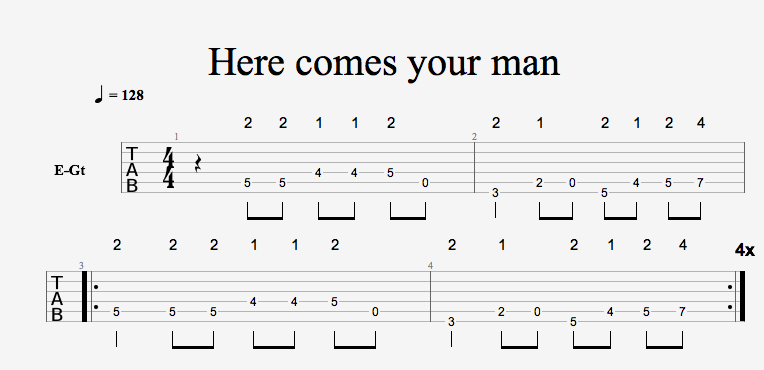
Guitar pro has a few settings - one of which you simply have the staff notation above the tab - but you have to program the rhythm whether you are inputting the notes in staff notation or tab. If you input in TAB it will automatically put it in staff, so you could literally use it without knowing anything about the staff in terms of _pitches,_ but you do have to know what rhythm to program.
in GP you can also be tab only but have the option of these little lines to indicate rhythm:
here’s an example
---
### Author:  [@garbeaj](https://forum.troygrady.com/u/garbeaj)
#### Post date: [March 20, 2018, 9:38pm UTC](https://forum.troygrady.com/t/some-easy-tips-for-presenting-tab-notation-in-the-forum-and-a-template-to-share/3006/20 "2018-03-20T21:38:32Z")
I see…yep, I can’t really use TAB programs because of this pre-requisite.
[Next page](https://forum.troygrady.com/t/some-easy-tips-for-presenting-tab-notation-in-the-forum-and-a-template-to-share/3006.md?page=2)